

Food Delivery App-Prototype


Product Name (Prototype): Food Ordering App
Overview: A mobile-first food delivery prototype designed to simplify ordering, personalize user journeys, and drive higher engagement through offers and upsells. The app balances delightful UI design with functional flows that reduce friction and encourage repeat usage.
Key Features
Personalized Onboarding: Greeting users by name and tailoring offers.
Discovery Hub: Categories, previous orders, and curated specials for quick decision-making.
Rich Product Pages: Detailed descriptions, ratings, and add-ons to build trust and increase order value.
Seamless Checkout: Transparent cart, editable instructions, and clear pricing.
Trust & Loyalty: Instant order confirmation and re-entry personalization (“Welcome back!”).
Frame-by-Frame Explanation
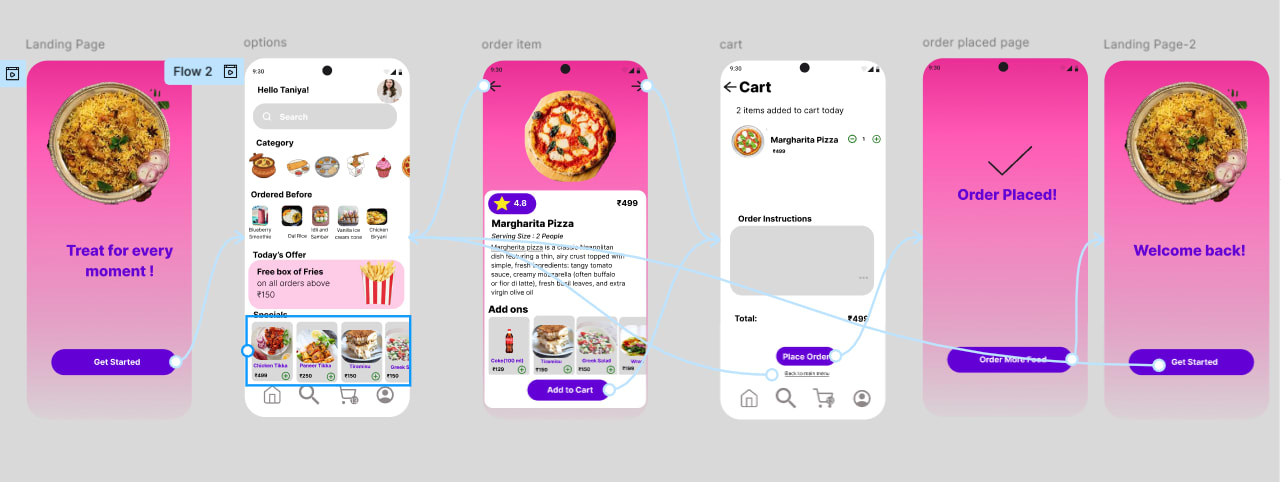
1. Landing Page
Purpose: First impression screen.
Design: Bright, engaging pink background with a food image (biryani).
Message: “Treat for every moment!” conveys delight and inclusivity.
Action: Clear CTA (“Get Started”) to onboard users quickly.
Role in flow: Sets tone, builds appetite appeal, and drives entry into the app.
2. Options Page
Purpose: Personalized browsing hub.
Features:
Greeting (“Hello Taniya!”) → personalization.
Search bar → quick access.
Categories & previously ordered items → convenience and habit reinforcement.
Offers (Free fries above ₹150) → nudges higher basket size.
Specials (Chicken Tikka, Paneer Tikka, etc.) → curated discovery.
Role in flow: Encourages exploration and upselling.
3. Order Item Page
Purpose: Detailed product showcase.
Features:
Item: Margherita Pizza (₹499) with rating (4.8 stars).
Rich description → builds trust and appetite.
Add-ons (ChocoTruffle, Tiramisu, Combo 2) → cross-sell opportunities.
“Add to Cart” button → clear conversion point.
Role in flow: Converts browsing into intent with upsell hooks.
4. Cart Page
Purpose: Review and finalize order.
Features:
Cart summary (“2 items added today”).
Editable instructions → user control.
Total amount displayed clearly.
“Place Order” button → strong CTA.
Role in flow: Ensures transparency and reduces drop-offs.
5. Order Placed Page
Purpose: Confirmation and reassurance.
Features:
Checkmark + “Order Placed!” → instant feedback.
“Order More Food” → encourages repeat engagement.
Role in flow: Builds trust and loyalty loop.
6. Returning Landing Page
Purpose: Re-entry experience for returning users.
Design: Similar to first landing page but with “Welcome back!” message.
Role in flow: Reinforces continuity and personalization for repeat users.
How to Use the App (User Flow)
Click on “Get Started” from the landing page.
Scroll to the bottom of the options page and move to the utmost right to select Margherita Pizza.
View product details (description, rating, add-ons).
Tap the “Add to Cart” CTA to add the item.
On the Cart Page:
Review items, add instructions, and check the total.
If you want to add more items, tap “Back to Main Menu” to return to browsing.
Once ready, tap “Place Order” to confirm.
On the Order Placed Page, you’ll see confirmation.
If you want to use the app again, tap “Order More Food” and then the “Get Started” CTA to restart the flow.
05 Feb 2026
Keywords