
TalentFlow AI


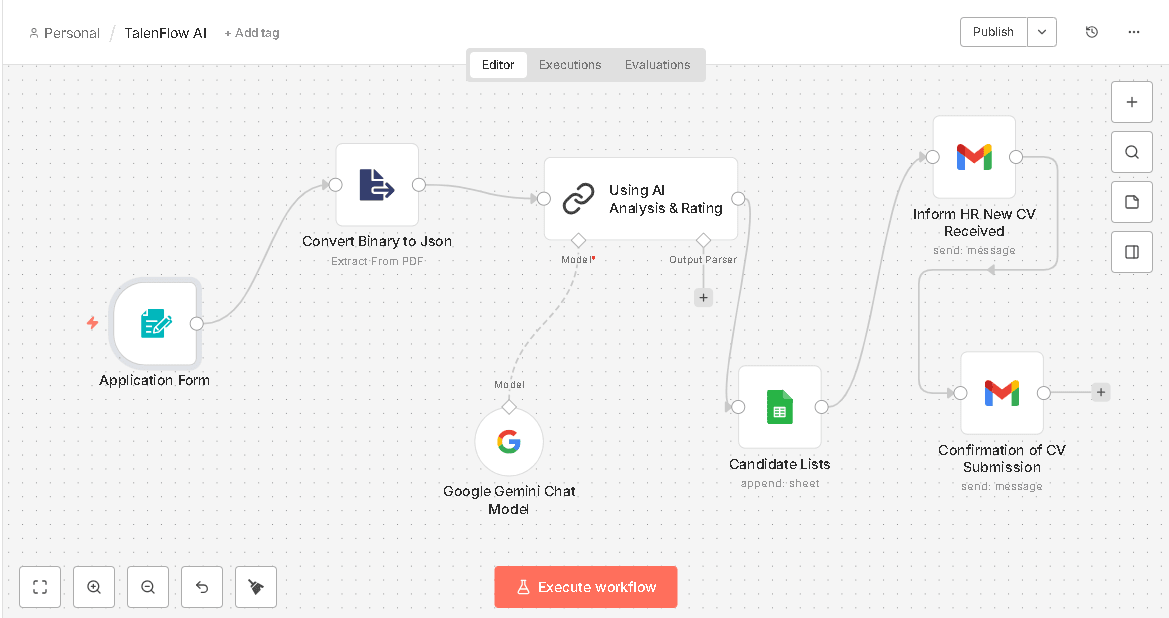
This workflow helps HR teams screen CVs with AI, store compatibility ratings in Google Sheets, and send email notifications to candidates and HR. It simplifies the recruitment process.
1. CV Submission Form:
Candidates submit their details and CV (PDF) through a web form, triggering the workflow in n8n.
2. PDF Extraction & AI Rating:
The submitted CV is processed to extract text, and AI analyzes it to generate a compatibility rating.
3. Results Storage & Notifications:
Ratings are stored in a Google Sheet for easy access and organization.
4. Confirmation emails are automatically sent to both HR and the candidate.
11 May 2026
Keywords


AI Usage
1. Automated Data Extraction: When an applicant submits their details and a resume (typically in PDF format) via a web form, the workflow automatically grabs the file. Instead of a human reading through the resume to find relevant details, a file-extraction node extracts the text, and AI is used to parse and structure this unstructured data (identifying keys like work history, skills, and education). 2. Intelligent Candidate Evaluation (The Core AI): The heart of the project uses a Basic LLM Chain (integrating an AI model like OpenAI's GPT or Anthropic's Claude) acting as an "HR Expert." The Input: The AI is fed the candidate’s extracted resume data and the specific requirements of the job description. The Processing: Using a custom system prompt, the AI evaluates how well the candidate’s qualifications align with the job. The Output: The AI generates a customized compatibility rating (e.g., a score from 1 to 10 or a percentage) along with a brief rationale (strengths, gaps, and fit). 3. Smart Decision-Making & Branching: The workflow uses the structured score returned by the AI to make instant, rule-based decisions. For example: High Score (e.g., $\ge$ 70%): The workflow identifies them as a strong match and automatically drafts/sends an email to HR or routes their profile to an interview scheduling stage. Low Score: It can flag the candidate for rejection or place them in a pool for later review. 4. Seamless Data Logging & Alerts : Once the AI completes its evaluation, the workflow automatically pushes the structured results (Candidate Name, Email, AI Score, and AI Feedback) directly into a Google Sheet. At the same time, it sends automated, personalized email notifications to the HR team (notifying them of a strong candidate) and confirmation emails to the applicant.