How to Add AI Stack on Fueler: 10 Real Examples, Best Practices, and Case Studies for Proof of Work Portfolios

Riten Debnath
20 May, 2026
AI is no longer a future technology.
It is already part of how students learn, how freelancers work, how marketers create campaigns, how developers write code, and how creators build projects online.
Today, people use tools like ChatGPT, Claude, Gemini, Midjourney, Cursor, and Perplexity every day to speed up work, improve ideas, and increase productivity.
But this shift has also created a new problem.
When someone uploads a portfolio project, assignment, case study, or proof-of-work online, it is becoming difficult to understand:
what was created manually,
what was AI-assisted,
how the workflow actually looked,
and how much thinking went into the final output.
At Fueler, we believe this confusion will become one of the biggest challenges in modern hiring.
Recruiters are no longer evaluating only the final output. They also want to understand the process behind the work.
That is why we launched Fueler AI Stack
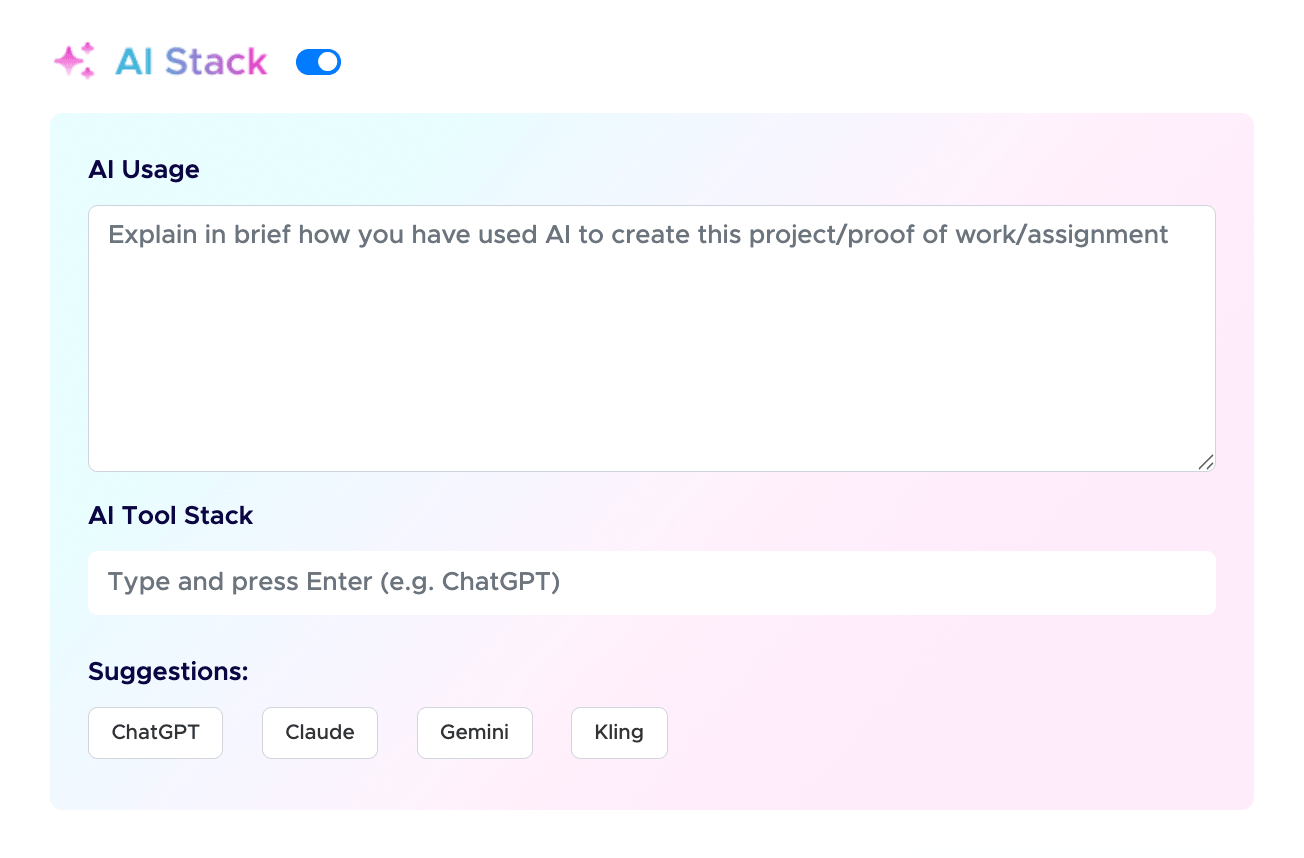
Fueler AI Stack to help Fueler Community Members
Fueler AI Stack allows users to explain how AI was used in their projects, assignments, and proof-of-work portfolios.
In this article, I will explain:
What AI Stack is
How to fill AI Stack correctly
What to write inside the AI Usage field
What tools to mention
Best practices for transparency
10 real examples of AI Stack entries for different projects
If you are a student, freelancer, creator, or job seeker building a portfolio, this guide will help you create stronger and more trustworthy proof-of-work.
What is Fueler AI Stack?
Fueler AI Stack is a feature that helps users openly explain how they used AI while creating a project or assignment.
Instead of hiding AI usage, users can now:
Mention AI tools used
Explain their workflow
Add context behind the project
Describe manual contributions
Showcase their thinking process
This creates transparency between candidates and companies.
The goal is not to judge AI usage.
The goal is to understand how intelligently someone used AI to create valuable work.
Why AI Stack Matters in Modern Hiring
The hiring world is changing very fast.
Earlier:
resumes were enough,
degrees mattered most,
and portfolios were optional.
Now companies want:
proof-of-work,
execution ability,
real projects,
assignments,
and workflow clarity.
At the same time, AI tools like ChatGPT, Claude, Gemini, Cursor, Midjourney, and Perplexity are becoming part of everyday work.
This means recruiters now care about:
how candidates think,
how they use AI,
and whether they can combine human judgment with AI leverage.
This is why AI Stack matters.
It adds context behind the output.
How to Add AI Stack on Fueler
When uploading a project on Fueler, users can enable the AI Stack toggle.
Inside AI Stack, there are two main sections:
1. AI Usage
This is where users explain:
how AI was used,
what tasks AI helped with,
and what work was done manually.
This section should be:
short,
honest,
clear,
and specific.
2. AI Tool Stack
This section allows users to mention the tools used during the project workflow.
Examples:
ChatGPT
Claude
Gemini
Cursor
Midjourney
Perplexity
GitHub Copilot
Runway
Notion AI
Kling
Best Practices for Writing AI Usage
Before we look at examples, here are some important tips.
1. Be Transparent
Do not try to hide AI usage.
Companies already know most professionals use AI today.
Transparency builds trust.
2. Explain the Workflow
Instead of writing:
“Used ChatGPT.”
Write:
“Used ChatGPT to brainstorm ideas, improve structure, and refine content clarity.”
This gives better context.
3. Mention Human Contribution
Explain what decisions were made manually.
For example:
research validation,
editing,
design choices,
coding architecture,
storytelling,
strategy.
4. Keep It Short and Clear
Do not write a long technical paragraph.
Simple 2-3 line explanations work better.
10 Real AI Stack Examples for Fueler Portfolios
Here are practical examples users can follow while filling the AI Stack section on Fueler.
1. Content Writing Portfolio Example
Project Title:
SEO Blog Article for a SaaS Brand
AI Usage:
Used ChatGPT during the research and planning stage to identify relevant SEO topics, generate article structure ideas, and brainstorm multiple headline variations. AI was also used to simplify complex information and improve readability during early drafts. Final writing, editing, keyword placement, internal linking strategy, examples, fact-checking, and SEO optimization were done manually to ensure originality, clarity, and brand alignment.
AI Tool Stack:
ChatGPT, Grammarly
2. UI/UX Design Project Example
Project Title:
Mobile App Redesign Case Study
AI Usage:
Used Midjourney and Figma AI to explore visual directions, interface inspirations, and moodboard concepts during the ideation phase. AI helped speed up design exploration and layout experimentation. Final user flows, wireframes, usability decisions, design systems, spacing, typography selection, and UI screens were manually designed based on user research and product thinking.
AI Tool Stack:
Midjourney, Figma AI
3. Video Editing Portfolio Example
Project Title:
Instagram Reel Editing Project
AI Usage:
Used Runway AI for automatic subtitle generation, background cleanup, and object masking to speed up the editing workflow. AI tools helped reduce repetitive editing work during the production process. Final storytelling, pacing, sound selection, transitions, motion timing, and creative direction were manually edited to maintain audience engagement and platform relevance.
AI Tool Stack:
Runway, Premiere Pro AI Tools
4. Software Development Assignment Example
Project Title:
Full Stack Job Assignment
AI Usage:
Used GitHub Copilot and ChatGPT to speed up debugging, generate boilerplate code, and assist with repetitive backend functions during development. AI was also used to explore alternative implementation approaches and improve development efficiency. System architecture, API planning, database schema design, authentication flow, deployment setup, testing, and feature logic were manually developed and validated.
AI Tool Stack:
GitHub Copilot, ChatGPT
5. Marketing Campaign Case Study Example
Project Title:
LinkedIn Growth Campaign
AI Usage:
Used Claude and ChatGPT during the ideation phase to brainstorm post hooks, campaign angles, audience pain points, and content variations. AI helped accelerate content research and idea generation. Final campaign strategy, audience positioning, posting schedule, analytics interpretation, engagement optimization, and execution decisions were manually planned based on platform insights and campaign goals.
AI Tool Stack:
Claude, ChatGPT
6. Product Management Portfolio Example
Project Title:
Product Requirement Document (PRD)
AI Usage:
Used Gemini and Notion AI to summarize competitor research, organize product notes, and structure feature documentation during the planning phase. AI was also used to simplify research-heavy information into actionable insights. Final feature prioritization, roadmap decisions, user problem analysis, product strategy, and workflow planning were manually created after evaluating business and user requirements.
AI Tool Stack:
Gemini, Notion AI
7. Graphic Design Proof-of-Work Example
Project Title:
Brand Identity Design
AI Usage:
Used Midjourney and Adobe Firefly to generate early-stage visual concepts, color palette inspirations, and creative references during the ideation process. AI helped explore multiple stylistic directions quickly before finalizing the design approach. Final logo construction, typography selection, brand guidelines, icon systems, spacing, and overall visual identity were manually designed to maintain originality and brand consistency.
AI Tool Stack:
Midjourney, Adobe Firefly
8. Research Assignment Example
Project Title:
Market Research Report for a B2B Saas
AI Usage:
Used Perplexity AI and ChatGPT to collect industry-level information, summarize lengthy reports, and identify important market trends during the research phase. AI helped organize large amounts of information faster and improve research efficiency. Final analysis, interpretation, data validation, comparisons, strategic insights, and conclusions were manually written after cross-checking sources and verifying accuracy.
AI Tool Stack:
Perplexity, ChatGPT
9. Social Media Management Example
Project Title:
30-Day Instagram Content Plan
AI Usage:
Used ChatGPT and Canva AI to generate content ideas, caption drafts, hashtag suggestions, and visual layout inspirations for the campaign. AI helped accelerate brainstorming and content planning workflows. Final content calendar, audience targeting, creative direction, posting strategy, visual consistency, and engagement planning were manually curated based on brand goals and audience behavior.
AI Tool Stack:
ChatGPT, Canva AI
10. Motion Graphics Project Example
Project Title:
Startup Product Launch Video
AI Usage:
Used Kling AI and AI-assisted animation tools to visualize concepts, generate reference frames, and explore storytelling directions during pre-production. AI helped speed up creative experimentation and scene visualization. Final storyboarding, motion timing, animation sequencing, sound synchronization, transitions, visual polish, and editing decisions were manually created to align with the product launch narrative and audience experience.
AI Tool Stack:
Kling, After Effects AI Tools
What Companies Can Learn from AI Stack
AI Stack helps recruiters understand:
how candidates approach work,
how they solve problems,
how they use modern tools,
and how much thinking goes behind the output.
This matters because good work is not just about generating content.
It is about:
making decisions,
refining ideas,
validating outputs,
understanding context,
and creating value.
A transparent workflow often says more about talent than the final output itself.
Why Fueler Focuses on Proof of Work
At Fueler, we strongly believe portfolios are becoming more important than resumes.
A resume says:
“I know this skill.”
A portfolio says:
“Here is proof.”
That difference matters.
This becomes even more important in the AI era.
Now companies do not just want polished outputs.
They want:
clarity,
process,
thinking,
and transparency.
Fueler AI Stack helps make portfolios more trustworthy.
The Future of Work Will Be AI-Assisted
I do not think AI will replace talented people.
But I strongly believe AI will replace outdated workflows.
The future belongs to people who:
know how to use AI responsibly,
combine creativity with leverage,
and communicate their process clearly.
That is why we built AI Stack.
Not to detect AI.
But to normalize transparent AI-assisted work.
Final Thoughts
The internet is moving toward visible work.
Now it is also moving toward visible workflows.
People no longer want to see only the result.
They want to understand:
how something was built,
how decisions were made,
and how AI contributed.
Fueler AI Stack helps users document that journey.
For students, freelancers, creators, and professionals, this creates a better and more trustworthy portfolio.
And for companies, it creates a smarter way to evaluate talent in the AI era.
FAQs
What should I write in the AI Usage section on Fueler?
In the AI Usage section, you should clearly explain how AI helped you during the project workflow. Instead of simply writing “Used ChatGPT,” try to add meaningful context about what tasks AI supported and what decisions were made manually.
For example, you can mention:
idea generation,
research assistance,
content structuring,
debugging,
moodboard creation,
editing support,
automation,
or brainstorming.
You should also explain which parts required your own thinking, creativity, strategy, or execution. This helps recruiters understand your workflow, problem-solving ability, and how responsibly you use AI tools in real projects.
How do I add AI tools to my Fueler portfolio?
While uploading a project on Fueler, you can enable the AI Stack feature and add the AI tools used during the project workflow.
You can mention tools such as:
ChatGPT
Claude
Gemini
Cursor
GitHub Copilot
Midjourney
Runway
Perplexity
Kling
Canva AI
Notion AI
The AI Tool Stack section helps recruiters understand the technologies and workflows you are familiar with. It also adds transparency to your proof-of-work portfolio.
Is it okay to use AI in portfolio projects?
Yes, absolutely.
AI is becoming a normal part of modern work across writing, design, coding, research, marketing, video editing, and product development. Most professionals today use AI tools in some form to improve speed, efficiency, research, or creativity.
What matters most is:
how you use AI,
what decisions you make manually,
how well you solve problems,
and whether you can create meaningful outcomes.
At Fueler, we believe transparent AI-assisted work is more valuable than pretending AI was never used.
Why is AI transparency important in hiring?
AI transparency helps companies understand the process behind the work, not just the final output.
Today, recruiters want to evaluate:
how candidates think,
how they approach problems,
how they use modern tools,
and how much real understanding they have.
When candidates explain their AI workflow honestly, it builds trust and gives recruiters better context about their skills, judgment, creativity, and execution ability.
In the AI era, transparency is becoming a competitive advantage.
How does Fueler AI Stack help job seekers?
Fueler AI Stack helps job seekers create stronger and more trustworthy proof-of-work portfolios.
Instead of only showcasing the final project, candidates can also explain:
their workflow,
AI-assisted process,
tools used,
research approach,
and manual contributions.
This helps recruiters better understand the candidate’s real capabilities and working style.
Fueler AI Stack also allows candidates to showcase AI fluency, which is becoming an important skill across industries. It helps students, freelancers, creators, and professionals stand out in a hiring market that increasingly values transparency, execution, and practical skills over traditional resumes alone.
What is Fueler Portfolio?
Fueler is a career portfolio platform that helps companies find the best talent for their organization based on their proof of work. You can create your portfolio on Fueler. Thousands of freelancers around the world use Fueler to create their professional-looking portfolios and become financially independent. Discover inspiration for your portfolio
Sign up for free on Fueler or get in touch to learn more.

What should you do next?
You've read the article. Now turn your skills into proof of work and unlock more opportunities.
Build your proof of work portfolio
Create a clean portfolio with projects, assignments, resumes, and AI stack details that companies actually want to see.
Create your Fueler portfolio →Apply through assignments, not resumes
Stand out by solving real tasks from companies hiring on Fueler.
Explore assignments →Get discovered by companies
Make your work public and let recruiters discover your skills through actual projects instead of keywords.
Get discovered →
