A cover has only a moment to win attention. In a busy feed, people decide in a flash whether to stop or scroll. A strong cover pairs a clear idea with bold, readable text.
Dreamina's latest and most advanced image generation model, Seedream 5.5, handles accurate text in complex scenes, varied text sizes, and layout optimization, which suits cover design well.
This guide shows how to plan layered text, apply a simple cover formula, and build both vertical covers and horizontal video thumbnails.
Why the first two seconds matter
Viewers scroll fast. A cover needs to hit the eye and spark curiosity almost immediately.
The manual calls this the golden two-second rule: grab attention and create a desire to click within two seconds. That means simple composition, big contrast, and text that can be read at a glance. Dreamina with Seedream 5.5 lets you explore several cover ideas quickly.
Meet Seedream 5.5, Dreamina's most advanced image generation model
Seedream 5.5 powers Dreamina's newest image tools and treats text as a core strength. Its main highlights include:
RGBA transparent layered generation for reusable assets
Precise editing of specified areas
Complex information design with accurate text and reasonable structure
Improved portrait realism
Intelligent lighting with movie-style presets
For covers, accurate text and layout optimization are the most useful features.
A simple formula for strong covers
The manual shares a short methodology: a good cover equals a strong pain point or benefit, plus eye-catching keywords, plus a clear sense of value, plus light suspense.
Use it as a checklist. What problem or benefit does the viewer care about? Which words should pop? What do they gain by clicking? And what small mystery makes them curious? Not every cover needs all four, but each one helps.
Build a cover in 3 fun steps with Dreamina
Step 1: Open Dreamina and write detailed text prompts
Open Dreamina, click "AI Image", and describe the image you want to produce.
Example prompt: Design a vertical social media cover with the headline "Why I Quit My Office Job and Started Climbing" in varied text sizes, with "Quit" and "Climbing" enlarged and highlighted in bright amber on a charcoal background, a young climber mid-reach on an indoor wall with chalk dust in the air, a small corner caption "Week 12 results", bold readable fonts, and strong contrast.
Step 2: Choose a model, settings, and generate
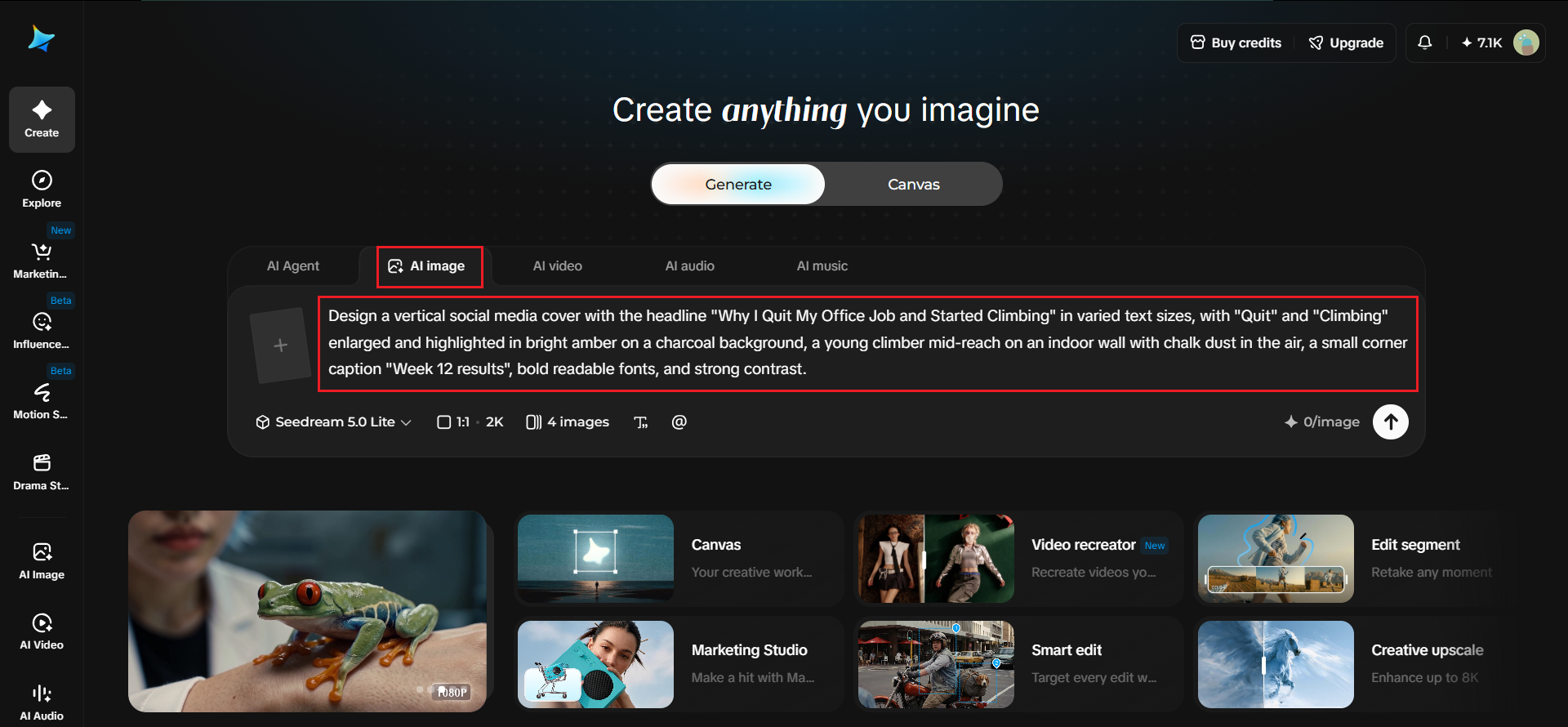
Choose "Image 5.5 by Seedream 5.5" and adjust the image settings to match your needs, such as aspect ratio, resolution, and number of outputs. Once done, click "Generate" to build the cover.
Step 3: Refine and export
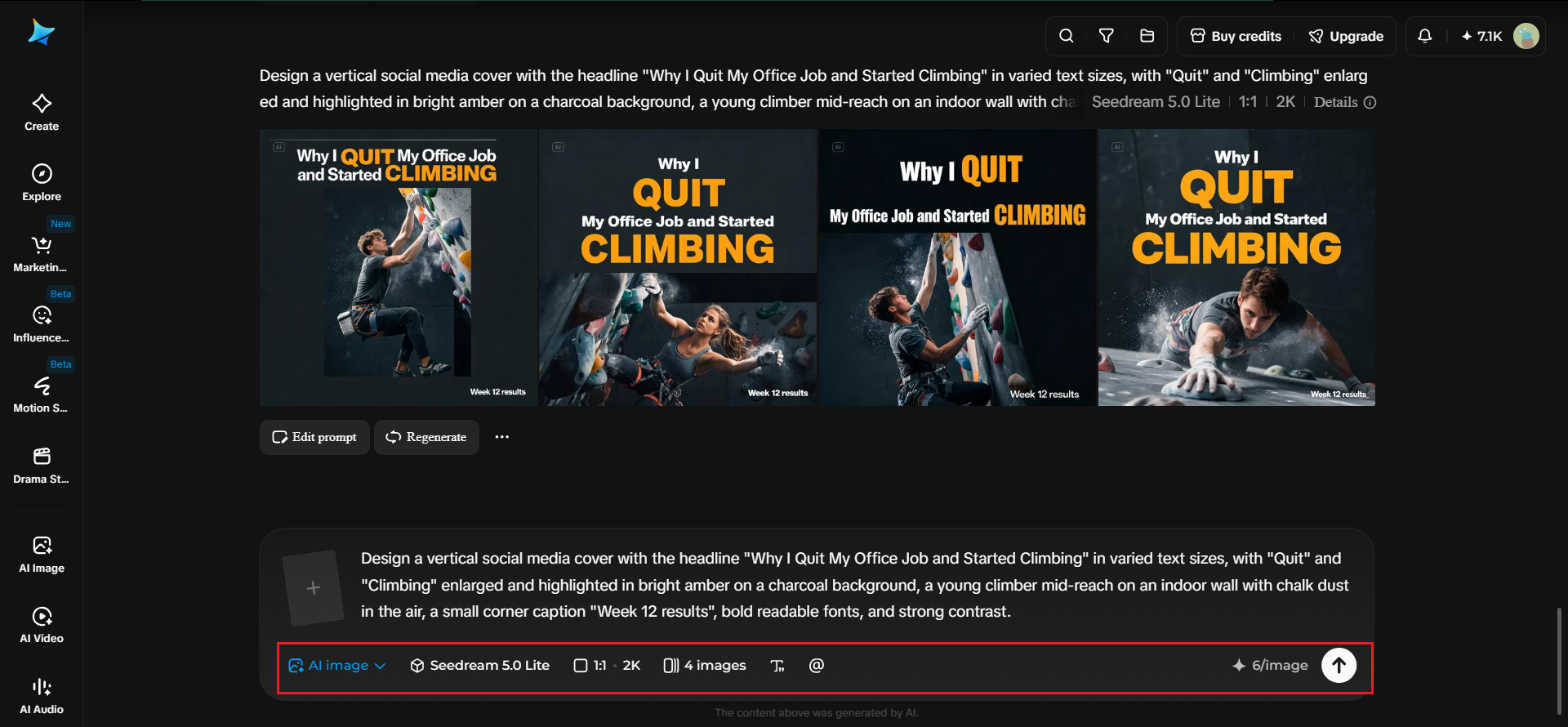
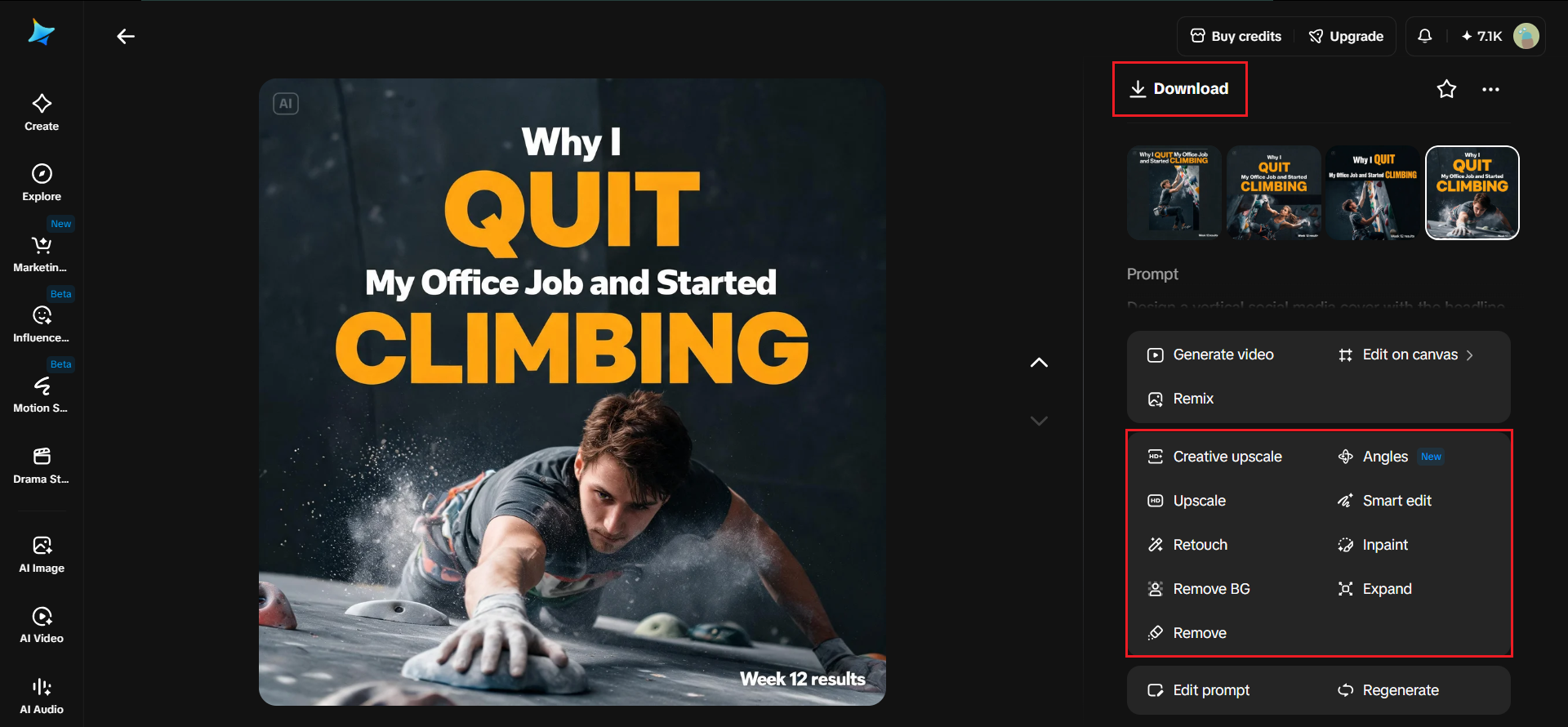
Fine-tune your specific areas by adjusting colors, shapes, text, or other visual details through follow-up edits. Once the cover looks right, check the final layout and text for accuracy, then click "Download" to save the generated cover image.
Layering text by importance
Layered text means different lines have different jobs. A big headline grabs attention, a smaller line adds detail, and tiny print supports the rest.
The manual's cover example asks for text that varies in size to highlight the key points. Decide what the viewer must read first, then make it the largest element. Keep secondary lines short and clearly smaller.
Writing headlines that work
A headline should be short, specific, and easy to read at a glance. Numbers, strong verbs, and clear benefits work well.
Put the exact wording in quotation marks, as the prompt guide recommends, and describe the font weight, color, alignment, and line count. Fewer words are easier to render accurately and easier for viewers to take in.
Layout and hierarchy
Plan the layout before the details. Say whether the text sits on the left, the person on the right, or the headline across the top.
The prompt guide advises setting the overall framework first, then the details. For covers, describe the main zones, such as headline, image, and small notes. A clear structure keeps the cover tidy even when the text is large.
Color and style for a young audience
The manual's video cover brief calls for an advanced and lively tone aimed at young people. That suggests bright accents, strong contrast, and modern type.
Name your palette and your style in the prompt. Choose colors that stand out against the background, and avoid cluttered patterns behind text. A clean backdrop helps large type read clearly.
Horizontal video thumbnails
Video covers are usually wide, so the layout changes. The text often sits to one side, with the key image on the other.
The manual's example uses the theme "Design with me." Describe the keyword, the visual, and the mood. Keep the main message in the center-left area, where viewers' eyes naturally land, and check that the cover still reads at small sizes.
Outfit-style covers
Lifestyle covers can show products around a person. The manual includes a prompt that converts a reference picture into an outfit-of-the-day image, extracting the outfit items and displaying them around the character with small explanatory print.
Ask for clear item placement and short captions. Adjust the background so everything is easy to see, and keep the style trendy. This format works well for fashion and shopping content.
Checking text and readability
Before you download, read every line. Small text can have errors, and big text can have spelling mistakes too.
Shrink the cover to thumbnail size and see if the main message still pops. If it doesn't, use a follow-up edit to enlarge the headline or increase contrast. Accuracy and readability matter more than decoration.
Showcase Your Creative Work with Fueler
Creating eye-catching social media covers and video thumbnails is a valuable skill for graphic designers, content creators, and digital marketers. But creating great designs is only one part of building a successful creative career. Showing potential clients and employers what you can do is equally important.
With Fueler, you can build a professional portfolio to showcase your best social media designs, YouTube thumbnails, and other creative projects. Instead of relying only on a traditional resume, you can demonstrate your skills through real examples of your work.
Whether you're experimenting with AI design tools like Dreamina or creating visuals for brands, adding these projects to your Fueler portfolio can help potential employers understand your creativity, design thinking, and practical abilities.
Start building your proof-of-work portfolio on Fueler and turn your creative projects into opportunities.
Final thoughts
Eye-catching covers come from clear ideas and clean text. With Dreamina's Seedream 5.5, you can apply a simple cover formula, layer text by importance, and explore both vertical covers and horizontal video thumbnails in minutes.
Plan your hierarchy, quote your text exactly, and check readability at small sizes, so every cover earns that crucial first glance.
Why 150,000+ professionals use Fueler
Fueler helps professionals showcase proof of work through projects, assignments, case studies, and achievements.
Thousands of professionals use Fueler to create their digital portfolio
Thousands of projects are published on Fueler. Check here
Startups and Companies hire through proof of work on Fueler
Used by freelancers, creators, marketers, video editors, writers, designers, and product managers
Our mission is to help the next 100 million professionals build a verified professional identity through proof of work