7 Best AI Logo Generator Tools for Startups in the United States

Riten Debnath
15 Mar, 2026
Starting a business in the U.S. is basically just paying for a bunch of expensive subscriptions and hoping your parents don't ask when you're getting a "real job." You’ve got the vision, the 2:00 AM caffeine shakes, and a business plan written on a napkin. But then you look at your bank account and realize that hiring a professional designer for $2,000 is about as realistic as finding a parking spot in Manhattan on a Friday night.
So, what do you do? You turn to AI. Because nothing says "I’m a serious CEO" like arguing with a robot at 3:00 AM about why your logo needs more "pizzazz" and less "clipart from 1998." Don't worry, we've done the dirty work for you. Here are the 7 best AI logo tools that won't make your startup look like a lemonade stand.
I’m Riten, founder of Fueler, a skills-first portfolio platform that connects talented individuals with companies through assignments, portfolios, and projects, not just resumes/CVs. Think Dribbble/Behance for work samples + AngelList for hiring infrastructure.
1. Design.com
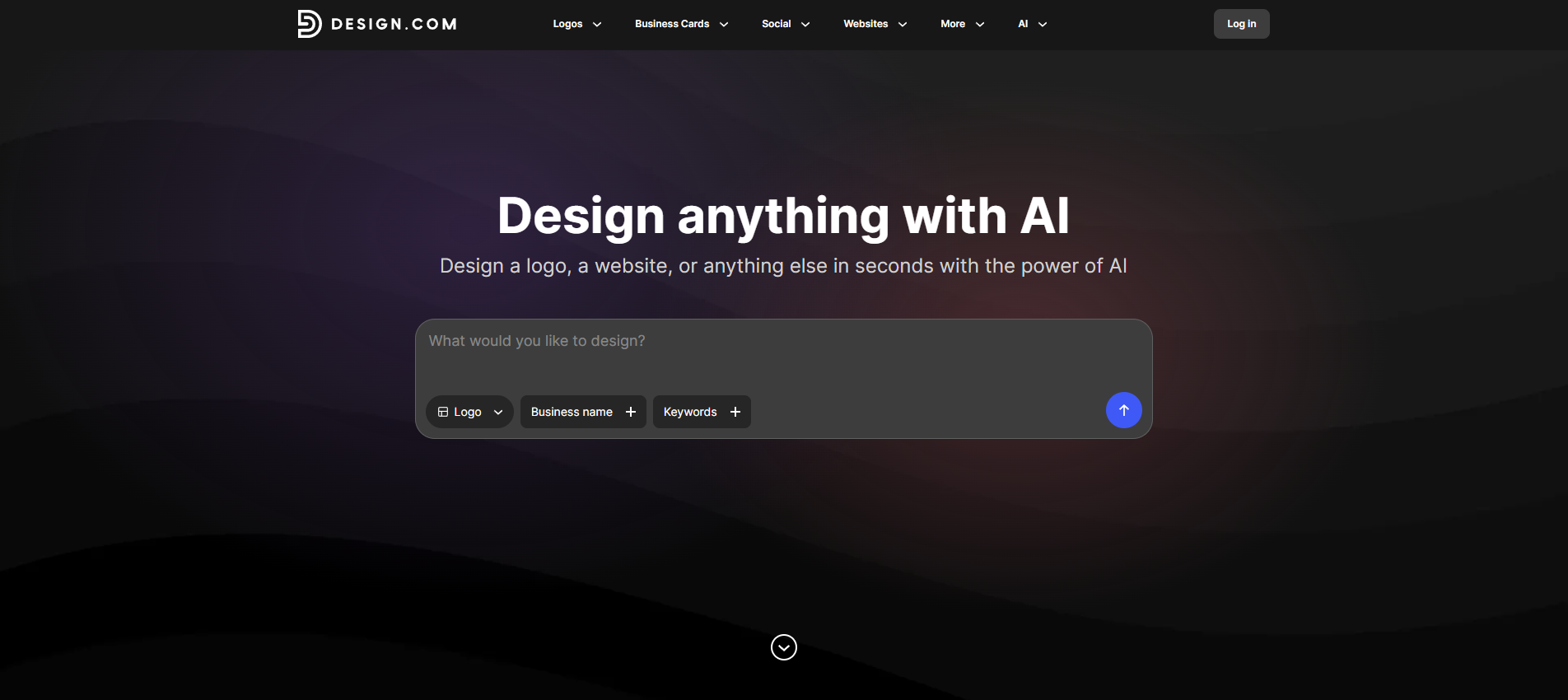
Design.com is built for founders who want a logo that actually looks like it belongs in their industry and custom-made for their particular brand identity, and not just some generic AI image. Design.com’s AI logo generator produces logos based on your business name, brand personality, and keywords, helping startups create a tailored visual identity in minutes. Whether you're launching a SaaS company, ecommerce store, consulting firm, fitness brand, or restaurant, Design.com focuses on delivering logos that already feel aligned with your brand from the start.
- Industry-Specific Branding Without the Guesswork: The platform generates logos designed around your niche, helping startups create a brand identity that feels aligned with customer expectations instead of looking like a random collection of icons and fonts. This is especially valuable when you're competing against established businesses and need to look credible immediately.
- Fast Results for Busy Founders: You can generate dozens of logo concepts within minutes, making it easy to move from idea to launch without spending days tweaking designs or managing freelancers. For startups operating on tight timelines, speed can be just as important as creativity.
- AI-Powered Editing That Feels Natural: Instead of manually adjusting every design element, Design.com lets you make edits through an AI chat interface. You can simply describe what you want changed and let the platform handle the design work for you.
- Brand Consistency Built In: Once you've created a logo, Design.com's Brand Kit automatically applies your visual style across additional marketing materials. This helps startups maintain a cohesive brand presence across websites, social media, and promotional assets without needing a dedicated designer.
- Flexible Files for Every Use Case: The platform provides logos in formats suitable for websites, social media, presentations, merchandise, and professional printing, ensuring your branding is ready wherever your business grows next.
Pricing (2026):
- Free: Free logos are available for download.
- Premium: Starts at $9/monthly. Plans unlock premium templates for download.
Why it matters: A startup's logo is often the first thing customers see. Design.com helps founders create logos that already look appropriate for their industry and audience, allowing them to launch with a professional, on-brand identity without hiring a designer or spending weeks on the branding process.
2. LogoAI
If you hate subscriptions as much as you hate taxes, LogoAI is your best friend. It’s straightforward, fast, and doesn’t try to trap you in a monthly payment cycle for a logo you’re only going to download once. It’s like a vending machine for branding: you put in your details, and it pops out a surprisingly high-quality logo that feels unique and modern.
- No-Nonsense Branding Efficiency: It’s built for the practical entrepreneur who just wants the files and wants to get back to building their actual product without a three-week "onboarding" process. This matters because it respects the breakneck speed of the U.S. startup market where being first to market is often more important than having a perfect kerning.
- Built-in Safety Rails for Non-Artists: The AI suggests color palettes and font pairings that are scientifically proven to look good together, saving you from making embarrassing fashion-disaster choices for your brand. Most of us think "neon purple" is a great idea until we see it on a screen and realize it actually burns our retinas.
- Permanent Cloud Storage for Brand Assets: Once you buy a package, you get a private download center where your files live forever, so you don't have to panic if you accidentally delete your "Final_Final_v2" folder. Business owners are notoriously bad at file management, and having a cloud backup included in the price is a massive peace of mind.
- Contextual Intelligence for Your Niche: It uses data from your specific niche whether you're in fintech or a pet grooming business to suggest symbols and styles that your target customers will actually recognize. A logo for a law firm shouldn't look like a logo for a heavy metal band, and the AI knows the difference even if you’re currently suffering from "founder brain-fog."
- High-End Results on a Bootstrapped Budget: It offers one of the most competitive prices for high-quality, high-resolution files without the "corporate tax" usually associated with branding agencies. For bootstrapped startups, spending every penny on development rather than a fancy logo can be the difference between making it and breaking it.
Pricing (2026):
- Basic Package: $29 (Standard res, 800x600px).
- Pro Package: $59 (High-res, vector files, transparent backgrounds).
- Brand Package: $99 (Everything + logo animations and business card templates).
Why it matters: Your time is literally money, and spending four hours picking a shade of blue is four hours you aren't spending closing deals. This tool prioritizes efficiency over endless tinkering.
3. Canva (Magic Media): The Ecosystem Advantage
You’re probably already using Canva to make memes or pitch decks, so you might as well use their AI-powered "Magic Media" to generate a logo. It’s built right into the sidebar you describe what you want, and it generates an image that you can then drag, drop, and destroy with 50 different filters.
- Frictionless Marketing Integration: Since your logo is already in Canva, you can slap it onto a social media post, a flyer, or a presentation in about two seconds. This turns your design process into a single, unified workflow where everything just fits together naturally and looks incredibly cohesive without searching through your "Downloads" folder.
- The Art Director’s Playground: Unlike other AI tools that give you a "take it or leave it" result, Canva lets you rip the logo apart and move every single piece until it’s exactly how you imagined it. This is perfect for the "visionary" founder who has a very specific idea and won't sleep until the icon is tilted exactly 12 degrees.
- Humanizing the AI Output: You get access to millions of free photos, icons, and shapes to supplement your AI-generated logo, ensuring it doesn't look like a generic robot creation. It helps you add that "human touch" that makes a brand feel authentic and relatable rather than just another cold, calculated AI-generated image.
- Real-Time Founder Collaboration: If you have a co-founder or a team, you can all jump into the same design and argue about the font in real-time. Branding is often a team sport, and having a tool that allows for instant feedback prevents the "too many cooks" problem from ruining the brand's potential.
- Financial Consolidation for Startups: If you're already paying for a Pro subscription for your social media management, the logo maker is effectively "free" to use. Startup costs add up like a CVS receipt, and being able to consolidate your tools into one subscription saves you hundreds of dollars a year.
Pricing (2026):
- Canva Free: $0 (Limited AI credits).
- Canva Pro: $15/month (or $120/year). Includes unlimited AI generations and full brand kits.
- Canva for Teams: $30/month (For up to 5 people).
Why it matters: It removes the "where did I save that logo?" hurdle that slows down every marketing department in existence. Your logo becomes an active, living part of your design workflow rather than a static file.
4. Brandmark.io: Aesthetic Sophistication for Unique Brands
Brandmark uses some serious math to create logos that feel a bit more organic and less like they were made by a cookie-cutter. It’s particularly famous for its color palettes, it picks combinations that actually make sense. It creates a complete brand system for you, showing you how your logo looks on a mobile app or a billboard.
- Standing Out in a Saturated Market: The AI here is built to avoid the common cliches of logo design, meaning you won't end up with the same "swoosh" icon as every other startup in your ZIP code. Your brand needs to stand out in a crowded market to be remembered by customers, and a unique look is your best weapon.
- Psychologically Sound Color Palettes: It automatically generates dozens of color variations that are balanced and professional, taking the guesswork out of "what looks good." Color psychology is a real thing, and Brandmark ensures your brand evokes the right emotionslike trust or excitementwithout you needing an art degree.
- Real-World Visualization Tools: It shows you exactly how your logo will look on "real-world" objects like shop signs, stationery, and websites before you even buy it. A logo might look great on a white screen but terrible on a t-shirt; seeing it in context helps you make a smarter, more durable branding decision.
- Consistency as You Scale: When you buy a package, it generates a basic style guide that tells you exactly which fonts and colors to use for everything else you build. This prevents your website from looking like a chaotic collage of random styles, helping you maintain a high-end, professional look as you scale.
- Predictable One-Time Pricing: It’s a simple one-time purchase with no recurring fees, which is a breath of fresh air in the "everything is a subscription" world. It’s a predictable cost that fits perfectly into a tight startup budget, giving you professional assets without a monthly drain on your cash flow.
Pricing (2026):
- Basic: $25 (One-time fee for PNG files).
- Designer: $65 (Source files, brand guide, and social media assets).
- Enterprise: $175 (Includes 10 original concepts hand-designed by their team).
Why it matters: In a world flooded with AI-generated content, looking "different" is a competitive advantage. Brandmark avoids the generic "AI look" to give you a brand that feels bespoke and premium.
5. Tailor Brands: All-in-One Business Launch Efficiency
Tailor Brands doesn't just want to give you a logo; they want to be your entire back office. They’ll help you form an LLC, set up a website, and give you a logo all in one go. The AI starts by asking you a bunch of questions about your style do you like "minimalist" or "elegant"?and then builds a logo that fits your specific industry.
- Legal and Creative Synergy: It combines the legal headache of forming an LLC with the creative fun of designing a logo, making it the ultimate starter kit for a new founder. Instead of juggling five different platforms, you can handle the most stressful parts of starting a business in one place, saving massive amounts of mental energy.
- Industry-Standard Brand Matching: The AI starts by asking you a bunch of questions about your style and industry, ensuring the final logo matches the expectations of your specific U.S. market. It acts as an automated consultant that keeps you from making a logo that is "cool" but totally inappropriate for your professional field.
- Scaling Beyond the Logo: It offers a social media auto-scheduler and an LLC filing service that stay with you long after the logo is finished. This matters because it provides a roadmap for business growth, helping you manage your brand and legal compliance as you transition from a "side hustle" to a real company.
- Integrated Web Presence: Since they also offer a website builder, your logo and site are designed to live together in perfect harmony. You won't have to worry about your logo's background color clashing with your website's header because the system is designed to maintain visual unity from the ground up.
- Guided Entrepreneurship Experience: It walks you through every step of the process, making it perfect for the "I have no idea what I’m doing" phase of a startup. This is especially helpful for first-time founders who feel overwhelmed by the sheer number of tasks required to get a business off the ground in the United States.
Pricing (2026):
- Lite (LLC + Logo): $0 + State Fees (Basic formation and simple logo).
- Essential: $199/year + State Fees (Includes annual compliance and high-res logo).
- Elite: $249/year + State Fees (Adds domain, website, and full brand suite).
Why it matters: Most founders fail because they get bogged down in administrative tasks. Tailor Brands automates the "boring stuff" so you can focus on your product.
6. Wix Logo Maker: Seamless Integration for Digital Businesses
If you’re building your site on Wix, using their Logo Maker is a total no-brainer. It uses the same AI logic as their website builder to make sure your logo actually looks good on your homepage. It’s very intuitive: you "vote" on a few logos to teach the AI your taste, and then it generates a massive list of options that you can customize.
- Optimized for Web Performance: The logos generated are specifically designed to look sharp on digital screens and mobile devices, which is where 90% of your customers will see you. This matters because a logo that looks good on paper might be unreadable on a smartphone screen, and Wix's AI is tuned to avoid that pitfall.
- Zero-Learning-Curve Customization: The editor is built to be so simple that you can't really "break" the design, keeping your logo within the bounds of professional aesthetics. This is vital for busy founders who want to make a quick change to their brand without spending three hours in a tutorial video.
- Social Media Formatting Autopilot: It automatically resizes your logo for over 40 different social media platforms, including profile pictures and headers. In the "always-on" U.S. social media landscape, this saves you from the tedious task of manually cropping and resizing images for every different app.
- Direct Dashboard Connectivity: Your logo lives inside your Wix site dashboard, meaning you can update it across your entire site with a single click. This prevents "brand drift," where your old logo is still hiding on an obscure sub-page while your new logo is on the homepage.
- Try-Before-You-Buy Security: You can play with the tool and generate thousands of designs for free, only paying once you find "The One." This removes the financial risk of hiring a designer or buying a tool only to realize you hate everything it produces for your specific brand.
Pricing (2026):
- Basic Plan: $20 (8 high-res PNG files).
- Advanced Plan: $50 (Adds vector files and social media logos).
- Logo + Website Bundle: Starting at $16/month (Logo included with most annual site plans).
Why it matters: Most startups today are "website-first." This tool ensures your brand identity and your primary sales channel (your site) are perfectly synchronized.
7. Hatchful by Shopify: The E-Commerce Speed King
Hatchful is Shopify's dedicated logo tool, and it is built for one thing: speed. It’s designed for the e-commerce entrepreneur who needs to launch a store today, not next month. It’s incredibly simple you pick your industry, your style, and it does the rest.
- Purpose-Built for Online Stores: The styles and symbols are specifically curated for retail and e-commerce brands, ensuring you look like a trustworthy shop. Trust is the #1 factor in making a sale online, and Hatchful helps you look like an established retailer from your very first transaction.
- The "Zero-to-Launch" Workflow: It is arguably the fastest tool on this list, requiring the fewest clicks to get from start to finish. This is perfect for the "serial entrepreneur" who is launching multiple niche stores and doesn't want to spend a fortune on branding for every single one.
- Ready-Made Social Graphics: It doesn't just give you a logo; it gives you a full package of assets for Facebook, Instagram, Pinterest, and even YouTube. This matters because e-commerce relies heavily on social proof and advertising, and having these assets ready to go means you can start running ads immediately.
- Transparent Branding for Growth: The designs are clean and minimalist, which is a major trend in modern e-commerce branding. Minimalist logos scale better and look more professional on mobile devices, ensuring your shop looks modern and high-end to the average American consumer.
- Mobile-First Design Interface: You can actually design a great logo entirely on your phone via their app, which is a lifesaver for the founder on the move. Whether you're at a transit stop or a coffee shop, you can build your brand identity without needing to sit down at a desk.
Pricing (2026):
- Free Tier: $0 (Limited high-res files, great for testing).
- Premium Assets: One-time fee of $15 - $30 (For full high-res and vector packages).
- Shopify Integration: Included for free with any Shopify subscription ($39/mo+).
Why it matters: In e-commerce, momentum is everything. Hatchful helps you move from "idea" to "selling" in under ten minutes, which is crucial for testing new product niches.
Final Thoughts
Choosing an AI logo generator is about balancing speed, control, and cost. If you want a full brand personality and aren't afraid of a small subscription, Looka is your best bet. If you want a clean, one-time purchase with high artistic value, Brandmark.io wins. For those building a site simultaneously, stick with Wix or Tailor Brands to keep your life simple.
FAQs
Can I trademark an AI-generated logo?
Yes. Trademark law focuses on how a logo identifies your brand in the marketplace, not who or what designed it. However, because AI tools use shared databases, your logo might not be unique enough for protection. Always perform a trademark search and add your own creative modifications to ensure distinctiveness.
Do I own the copyright to an AI logo?
Likely no, not for the "pure" AI output. U.S. copyright law requires "human authorship." To claim copyright, you must document significant human creative contributions like your specific prompts, iterations, or hand-drawn adjustments that move the final design beyond what the AI produced on its own.
How do I make my AI logo unique?
Stop clicking "generate" on generic prompts like "modern tech logo." Be hyper-specific about your industry, aesthetic, color psychology, and brand values. Use the AI as a sketchpad, then refine the result manually to ensure it doesn't look like a template that hundreds of other businesses are also using.
Which file formats are mandatory for a professional logo?
Always secure vector files (SVG, EPS, or PDF). These are mathematically generated, meaning you can scale them from a business card to a massive billboard without losing quality. If a service only offers low-resolution PNGs or JPGs, do not use them for your primary brand identity.
Why pay for these tools if free ones exist?
Free versions are often "teasers" that restrict you to low-resolution files or lack the commercial rights needed to build a legitimate business. Paying for a premium package usually grants you full ownership, high-quality vector files, and the transparency needed to legally protect your brand as you scale.
What is Fueler Portfolio?
Fueler is a career portfolio platform that helps companies find the best talent for their organization based on their proof of work. You can create your portfolio on Fueler. Thousands of freelancers around the world use Fueler to create their professional-looking portfolios and become financially independent. Discover inspiration for your portfolio
Sign up for free on Fueler or get in touch to learn more.

What should you do next?
You've read the article. Now turn your skills into proof of work and unlock more opportunities.
Build your proof of work portfolio
Create a clean portfolio with projects, assignments, resumes, and AI stack details that companies actually want to see.
Create your Fueler portfolio →Apply through assignments, not resumes
Stand out by solving real tasks from companies hiring on Fueler.
Explore assignments →Get discovered by companies
Make your work public and let recruiters discover your skills through actual projects instead of keywords.
Get discovered →
